
Updating nodes
A node updates as a whole: the next release’s system is written to its idle slot, checked, and booted - its configuration kept - and the node goes back to the previous release by itself if HAProxy doesn’t come back healthy. How it works: lifecycle.
When there’s an update
Section titled “When there’s an update”The Controller checks for new releases and shows, on each node’s card, whether an update is available - with a 🔒 when it fixes a vulnerability on that node (an extension’s fix only for the nodes that have it). Only the latest release is supported: install security updates promptly (security policy).
From the Controller
Section titled “From the Controller”On the node’s page, System › Update:
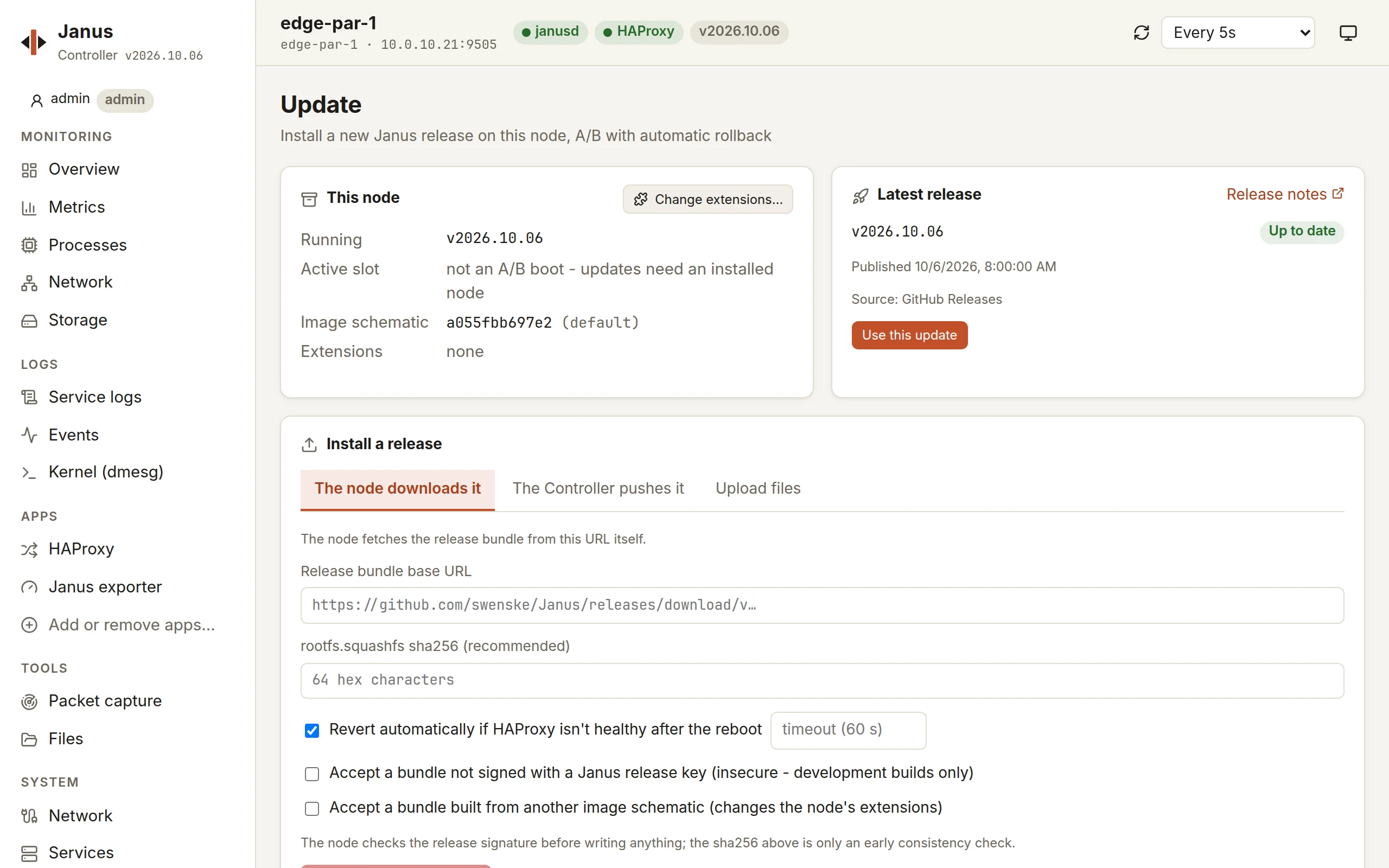

- It shows the node’s release, slot and extensions, and the release to install - from its GitHub release, or built by the image factory for the node’s extensions.
- Install a release, in one of three ways:
- the node downloads it - from GitHub or the image factory;
- the Controller pushes it - for a node that can’t reach the internet: the Controller downloads the bundle and streams it to the node;
- upload files - a bundle from your computer, through the Controller.
- Keep automatic revert on: the node confirms itself only once HAProxy answers healthily after the reboot, and goes back otherwise.
- Install and reboot: the page follows the node through its reboot until it’s back, on its new slot.
Update the nodes of a pair one at a time: before rebooting, a node gives its virtual IP or its BGP route up, so the other one serves alone for the minute it takes.
Changing extensions is an update too: Change extensions… on the same page asks the image factory for the newest release built with the extensions you pick, and the installation confirms which ones the node gains and loses (images and extensions).
With janusctl
Section titled “With janusctl”v=v2026.10.05-5janusctl -n lb1 lifecycle upgrade -wait-for-health \ https://github.com/swenske/Janus/releases/download/$v/janusctl -n lb1 version # the release now running, and its slot-wait-for-healthis the automatic revert;-health-timeouthow long HAProxy has to be healthy.- A node with extensions takes its schematic’s bundle - the URL the
image factory
gives for it - and refuses another schematic’s unless
-allow-schematic-change. - A node that can’t reach the URL:
janusctl lifecycle upload-release DIRstreams a bundle from wherejanusctlruns, thenupgradetakes the directory it prints.
Going back
Section titled “Going back”janusctl -n lb1 lifecycle rollback: the node reboots into its other
slot - the release it ran before, with the same configuration.
When an update reverted
Section titled “When an update reverted”The node is back on its previous release, serving as before. Its event log and janusd’s output say why:
janusctl -n lb1 system eventsjanusctl -n lb1 system logs -n 100 janusdThe usual cause is a HAProxy configuration the new release refuses - a keyword its TLS library doesn’t support, say (TLS: AWS-LC): fix it on the node, then update again.
The Controller itself
Section titled “The Controller itself”One click on the Controller’s page, with its updater running next to it
- and if the new version doesn’t come up, the previous one comes back with its data: updating the Controller.